
In this Video I have discussed about Mean Reversion Intraday Trading Strategy
More from JayneshKasliwal


The Ultimate Guide to moving averages !
A mega thread to understand the Use of 21 , 50 and 200 ema.
4 Effective uses of Exponential Moving Averages !
Retweet and Share 🔄
#stockmarkets #nifty
@kuttrapali26 @caniravkaria
Once Can refer the use of Moving Averages Throught this thread
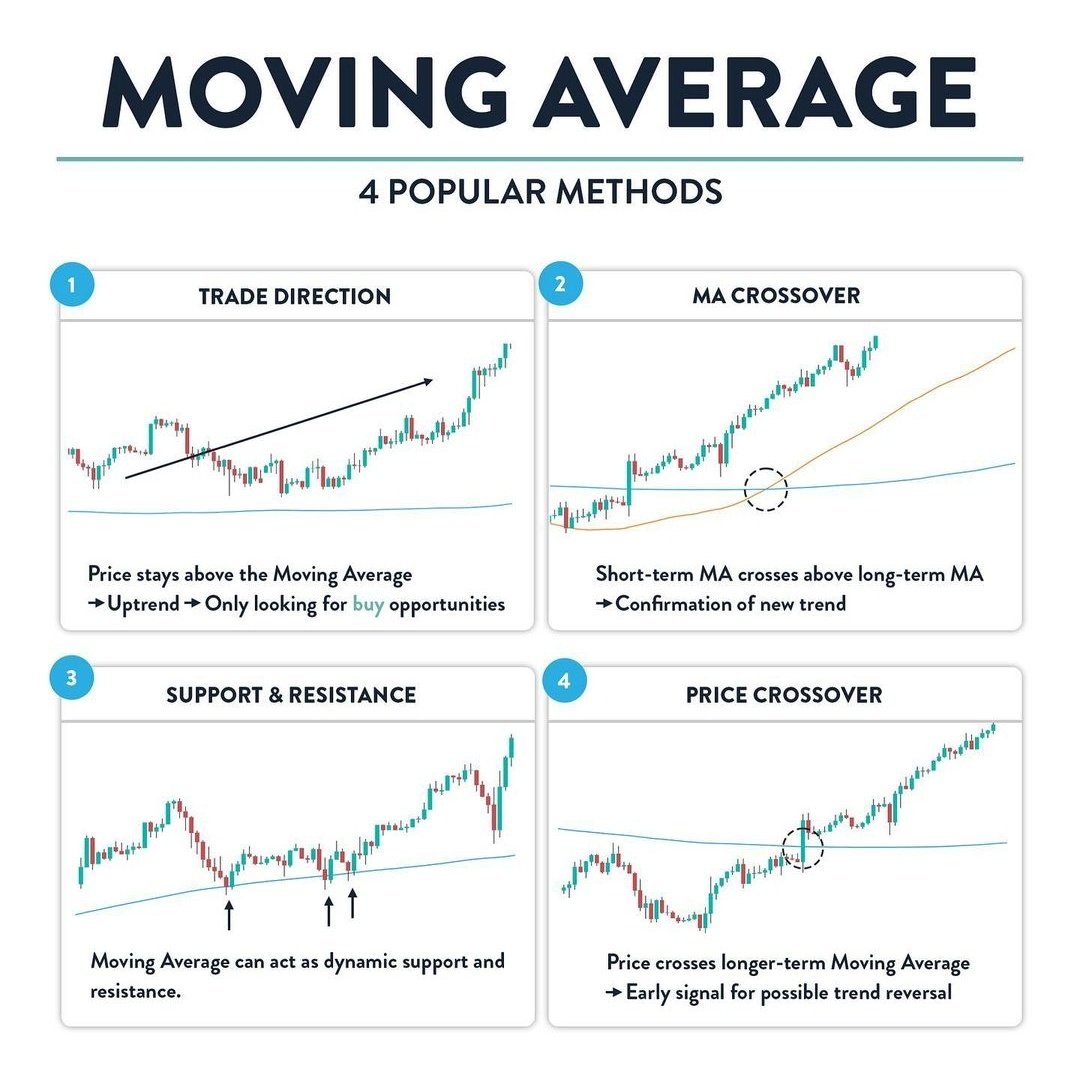
4 Popular uses of moving averages
1. Identifying the direction of trend
2. MA crossover
3. Dynamic Support and Resistance
4. Price Crossing above Key EMAs
Note : In chart 21 ema is red , 50 ema is green and 200 ema is black
2/n
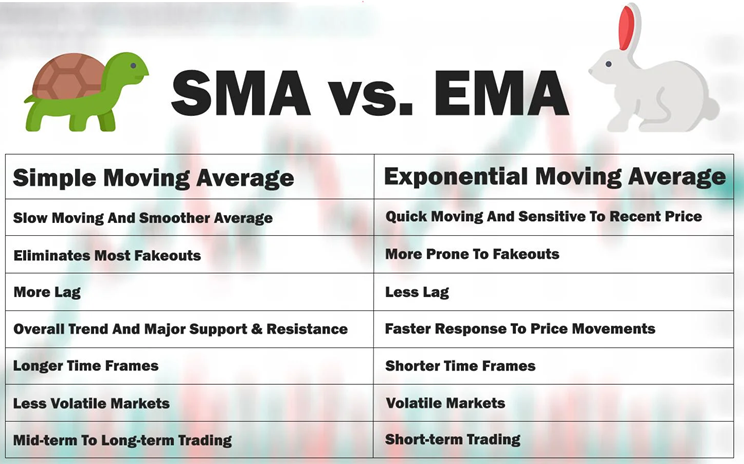
Why EMA and not SMA ?
EMA is fast , accurate and prices in recent data !
3/n
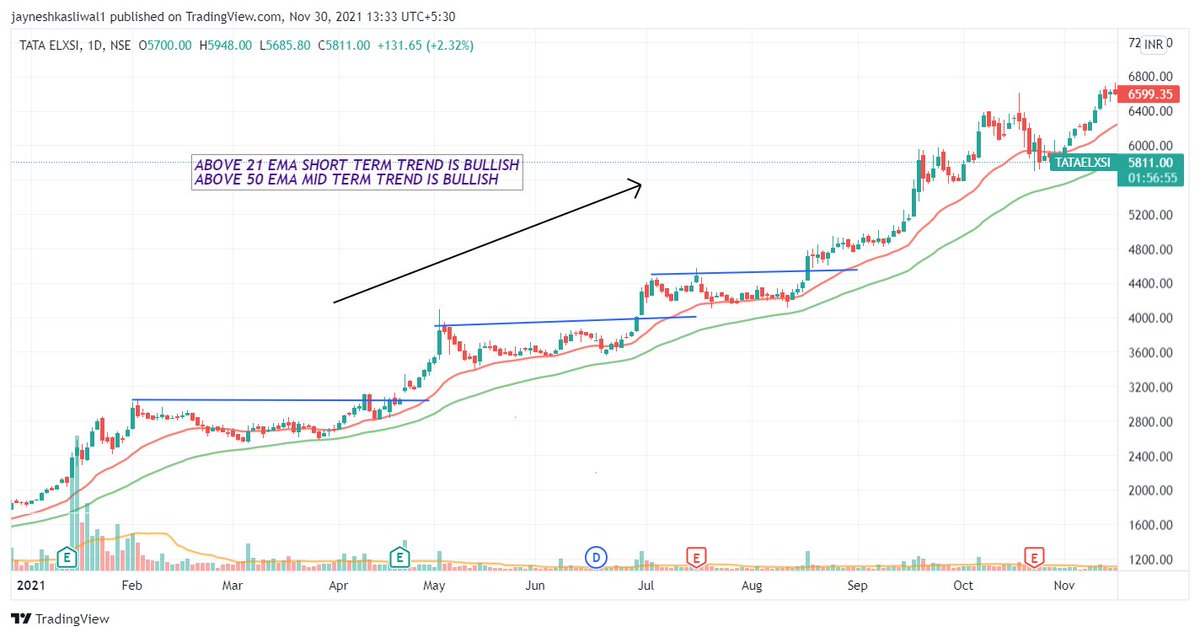
Use 1 : Identifying the trend of stock on dtf
The 21 ema will tell us the Short term trend of a stock , while the 200 ema will tell us the long term trend of a stocks
Any EMA that is sloping
:upwards trend is BULLISH
:sideways trend is NEUTRAL
:downwards trend is BEARISH
4/n
A mega thread to understand the Use of 21 , 50 and 200 ema.
4 Effective uses of Exponential Moving Averages !
Retweet and Share 🔄
#stockmarkets #nifty
@kuttrapali26 @caniravkaria
Once Can refer the use of Moving Averages Throught this thread
ULTIMATE GUIDE TO 21 and 200 Moving Average
— JayneshKasliwal (@JayneshKasliwal) November 14, 2021
SUNDAY THREAD \U0001f516
A trend Following System That will Help You Improve Trading immensely.
RETWEET AND SHARE \U0001f504@kuttrapali26 @AmitabhJha3 #stocks #StockMarket
1/n
4 Popular uses of moving averages
1. Identifying the direction of trend
2. MA crossover
3. Dynamic Support and Resistance
4. Price Crossing above Key EMAs
Note : In chart 21 ema is red , 50 ema is green and 200 ema is black
2/n
Why EMA and not SMA ?
EMA is fast , accurate and prices in recent data !
3/n
Use 1 : Identifying the trend of stock on dtf
The 21 ema will tell us the Short term trend of a stock , while the 200 ema will tell us the long term trend of a stocks
Any EMA that is sloping
:upwards trend is BULLISH
:sideways trend is NEUTRAL
:downwards trend is BEARISH
4/n


More from Trading strategies




Detailed Study of Stocks that became 5X in past 2 Years
A Mega Thread🧵
Concepts :
Relative Strength
Stage Analysis
Retweet and Comment If you want to attend a live session on the same !

We have Got around 86 Stocks that became 5X in 2 years
These Belonged to various sectors and Groups
Excel Link for List of Stocks
https://t.co/jESOUM32b5
1/n
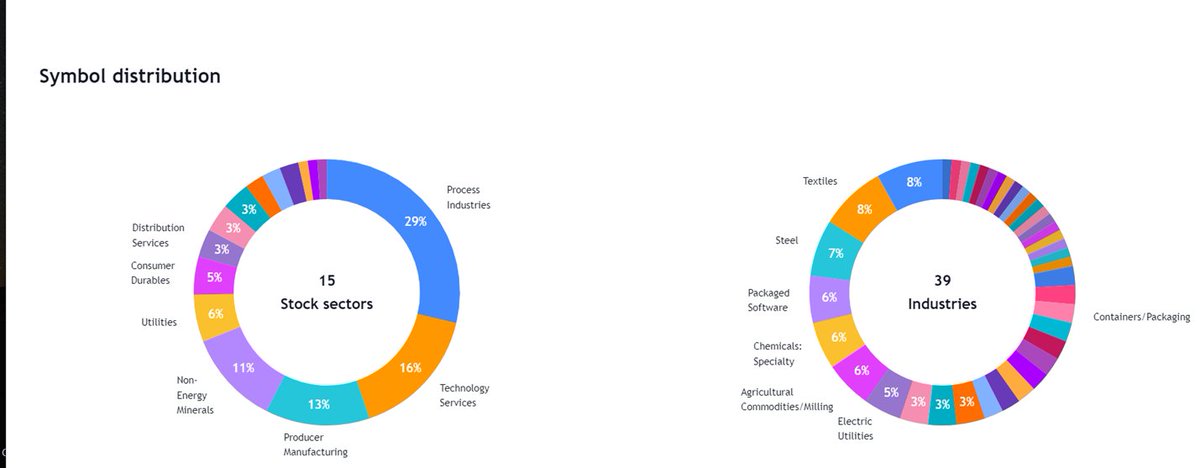
All stocks had few things in common :
Stocks doubled Before entering into Stage 2 Uptrend
52 week RS was positive in stage 2
90% stocks even gave all time high breakout after Stage 2
60 Stocks had market cap less than 1000 Cr
Examples : OLECTRA , PGEL
2/n
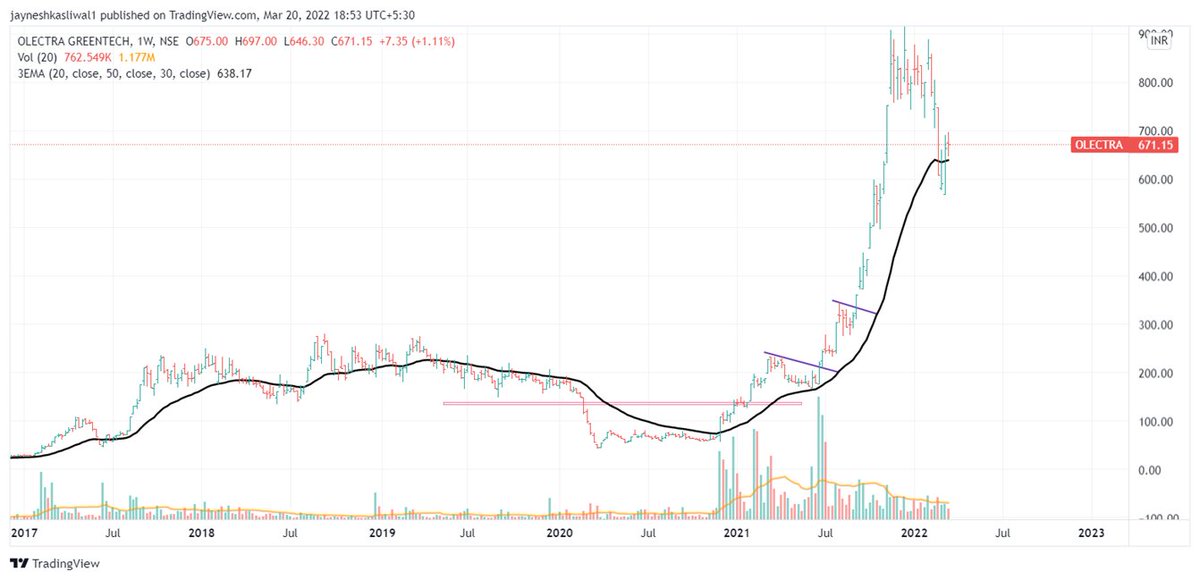
So What is Relative Strength ?
Relative strength is a strategy used in momentum investing and in identifying value stocks.
It focuses on investing in stocks or other investments that have performed well relative to the market as a whole or to a relevant benchmark.
3/n
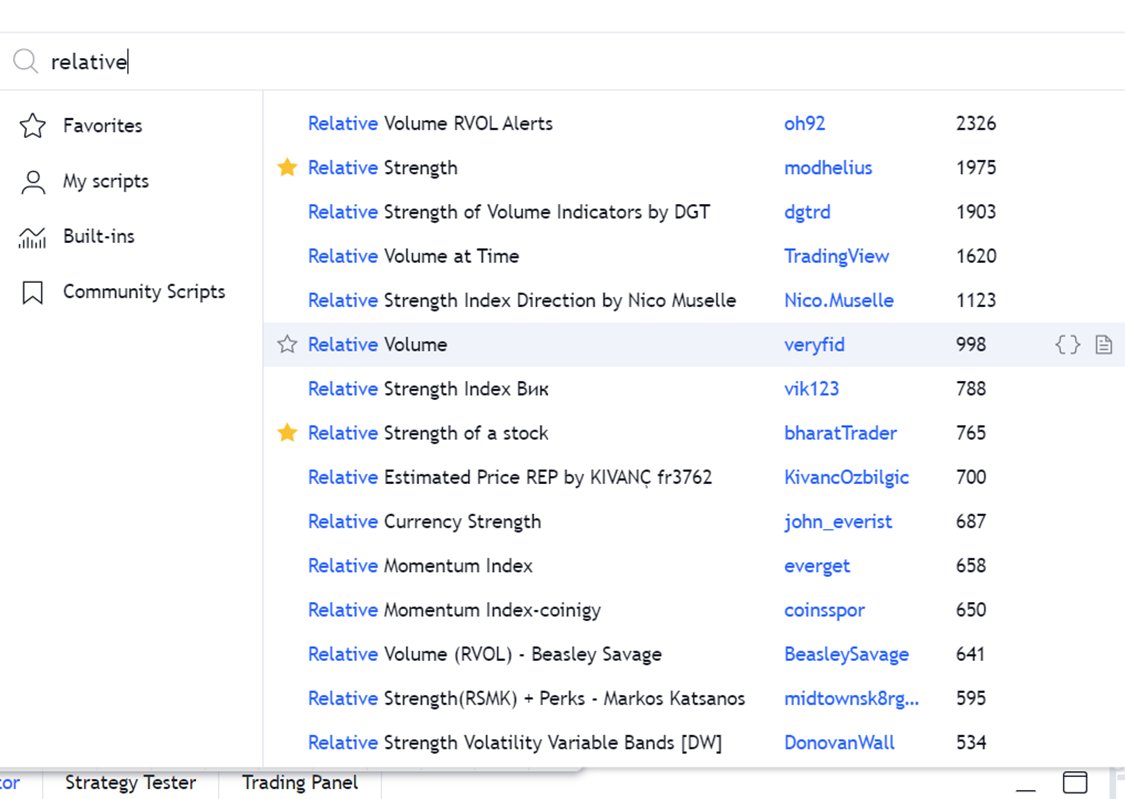
How to Apply ?
Type
“Relative Strength”
Choose any
By bharattrader
By traderlion
By Modhelius
I use by bharattrader
In setting use 52 period
Use Weekly Chart
4/n
A Mega Thread🧵
Concepts :
Relative Strength
Stage Analysis
Retweet and Comment If you want to attend a live session on the same !
We have Got around 86 Stocks that became 5X in 2 years
These Belonged to various sectors and Groups
Excel Link for List of Stocks
https://t.co/jESOUM32b5
1/n
All stocks had few things in common :
Stocks doubled Before entering into Stage 2 Uptrend
52 week RS was positive in stage 2
90% stocks even gave all time high breakout after Stage 2
60 Stocks had market cap less than 1000 Cr
Examples : OLECTRA , PGEL
2/n
So What is Relative Strength ?
Relative strength is a strategy used in momentum investing and in identifying value stocks.
It focuses on investing in stocks or other investments that have performed well relative to the market as a whole or to a relevant benchmark.
3/n
How to Apply ?
Type
“Relative Strength”
Choose any
By bharattrader
By traderlion
By Modhelius
I use by bharattrader
In setting use 52 period
Use Weekly Chart
4/n


3 Ways to ride a stock 🐎
(a thread) 🧵
>Do retweet if it adds value as this took a long time for me to make
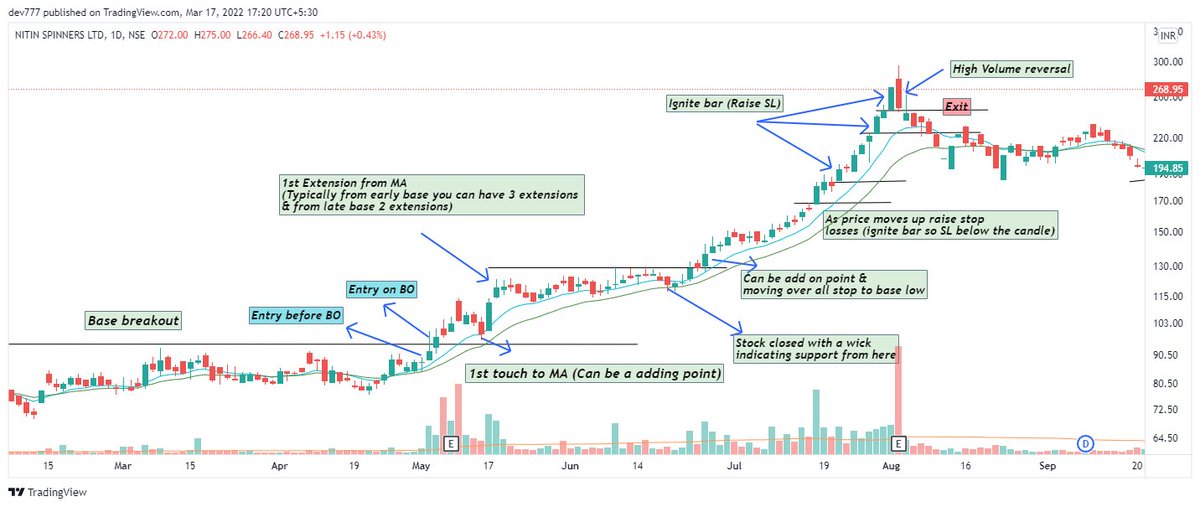
1) 10/20 Day EMA -
Enter the stock as it comes up back to the 10/20 day EMA and ride it till it drops below or SL hits as explained below
Eg -Nitin Spinners as below
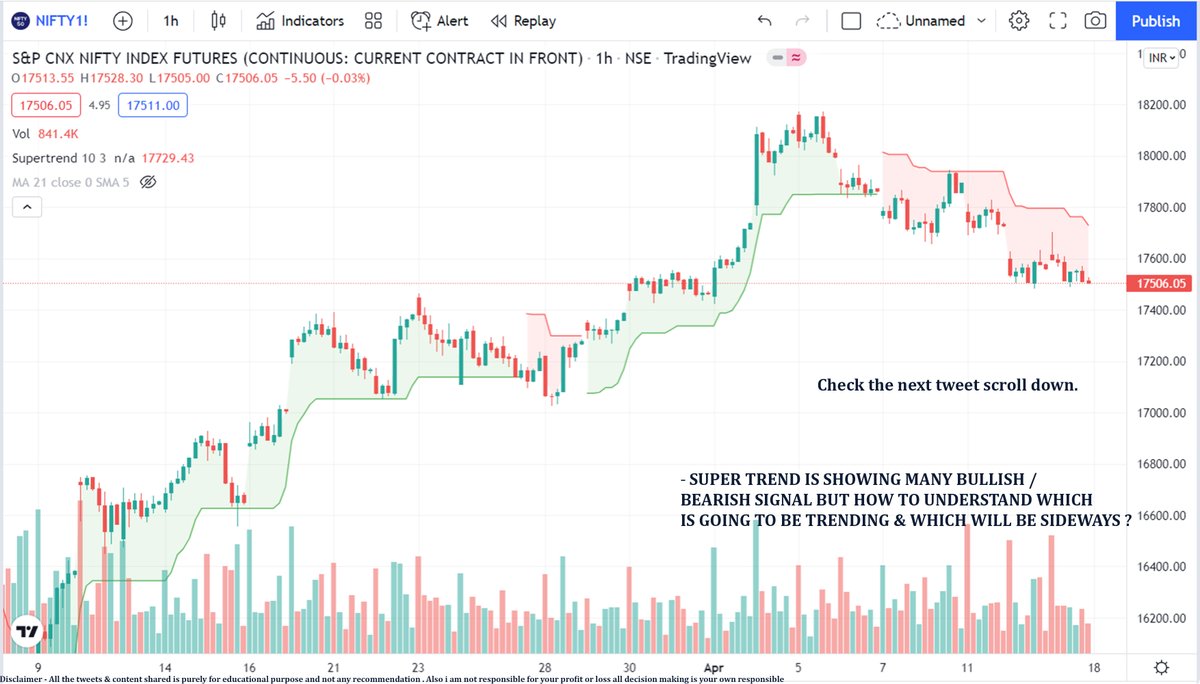
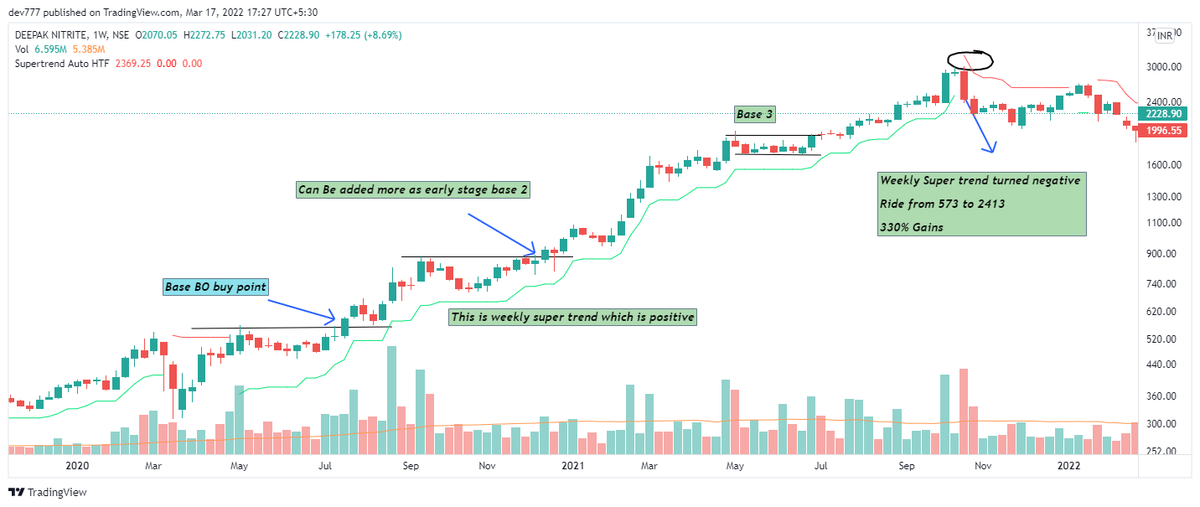
2) Weekly Super trend (Setting 2,7): Whenever trend changes , volatility increases & supertrend measures volatility..That's the logic behind it
Eg - Deepak Nitrite
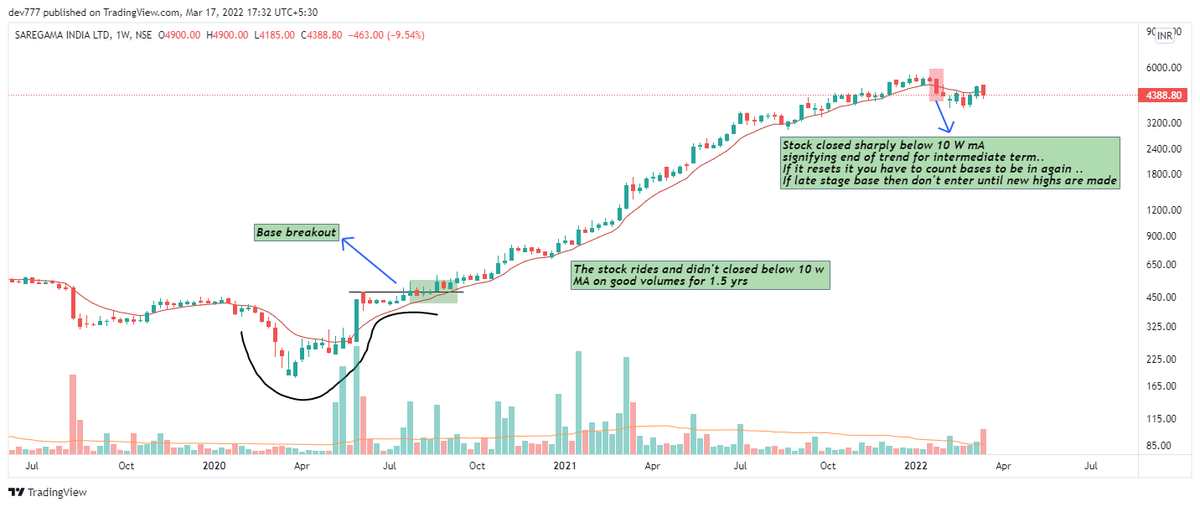
3) 10 Week MA : Trend following can be done using 10 w MA
Eg - Saregama
Fundamental analysis has to be done for best results as these are to be applied on a growing co + sector movt together ..Eg If you will apply to random co with low RS or low growth..This might be very choppy
Do retweet if make sense so as I can make more of such thread
Join telegram group for stock analysis & daily updates
https://t.co/lJ00OKEVd2
Download equialpha app for free momentum basics course
https://t.co/9N7vFDorC8
Thanks for reading.. Do like
(a thread) 🧵
>Do retweet if it adds value as this took a long time for me to make
1) 10/20 Day EMA -
Enter the stock as it comes up back to the 10/20 day EMA and ride it till it drops below or SL hits as explained below
Eg -Nitin Spinners as below
2) Weekly Super trend (Setting 2,7): Whenever trend changes , volatility increases & supertrend measures volatility..That's the logic behind it
Eg - Deepak Nitrite
3) 10 Week MA : Trend following can be done using 10 w MA
Eg - Saregama
Fundamental analysis has to be done for best results as these are to be applied on a growing co + sector movt together ..Eg If you will apply to random co with low RS or low growth..This might be very choppy
Do retweet if make sense so as I can make more of such thread
Join telegram group for stock analysis & daily updates
https://t.co/lJ00OKEVd2
Download equialpha app for free momentum basics course
https://t.co/9N7vFDorC8
Thanks for reading.. Do like
You May Also Like










A brief analysis and comparison of the CSS for Twitter's PWA vs Twitter's legacy desktop website. The difference is dramatic and I'll touch on some reasons why.
Legacy site *downloads* ~630 KB CSS per theme and writing direction.
6,769 rules
9,252 selectors
16.7k declarations
3,370 unique declarations
44 media queries
36 unique colors
50 unique background colors
46 unique font sizes
39 unique z-indices
https://t.co/qyl4Bt1i5x

PWA *incrementally generates* ~30 KB CSS that handles all themes and writing directions.
735 rules
740 selectors
757 declarations
730 unique declarations
0 media queries
11 unique colors
32 unique background colors
15 unique font sizes
7 unique z-indices
https://t.co/w7oNG5KUkJ

The legacy site's CSS is what happens when hundreds of people directly write CSS over many years. Specificity wars, redundancy, a house of cards that can't be fixed. The result is extremely inefficient and error-prone styling that punishes users and developers.
The PWA's CSS is generated on-demand by a JS framework that manages styles and outputs "atomic CSS". The framework can enforce strict constraints and perform optimisations, which is why the CSS is so much smaller and safer. Style conflicts and unbounded CSS growth are avoided.
Legacy site *downloads* ~630 KB CSS per theme and writing direction.
6,769 rules
9,252 selectors
16.7k declarations
3,370 unique declarations
44 media queries
36 unique colors
50 unique background colors
46 unique font sizes
39 unique z-indices
https://t.co/qyl4Bt1i5x
PWA *incrementally generates* ~30 KB CSS that handles all themes and writing directions.
735 rules
740 selectors
757 declarations
730 unique declarations
0 media queries
11 unique colors
32 unique background colors
15 unique font sizes
7 unique z-indices
https://t.co/w7oNG5KUkJ
The legacy site's CSS is what happens when hundreds of people directly write CSS over many years. Specificity wars, redundancy, a house of cards that can't be fixed. The result is extremely inefficient and error-prone styling that punishes users and developers.
The PWA's CSS is generated on-demand by a JS framework that manages styles and outputs "atomic CSS". The framework can enforce strict constraints and perform optimisations, which is why the CSS is so much smaller and safer. Style conflicts and unbounded CSS growth are avoided.