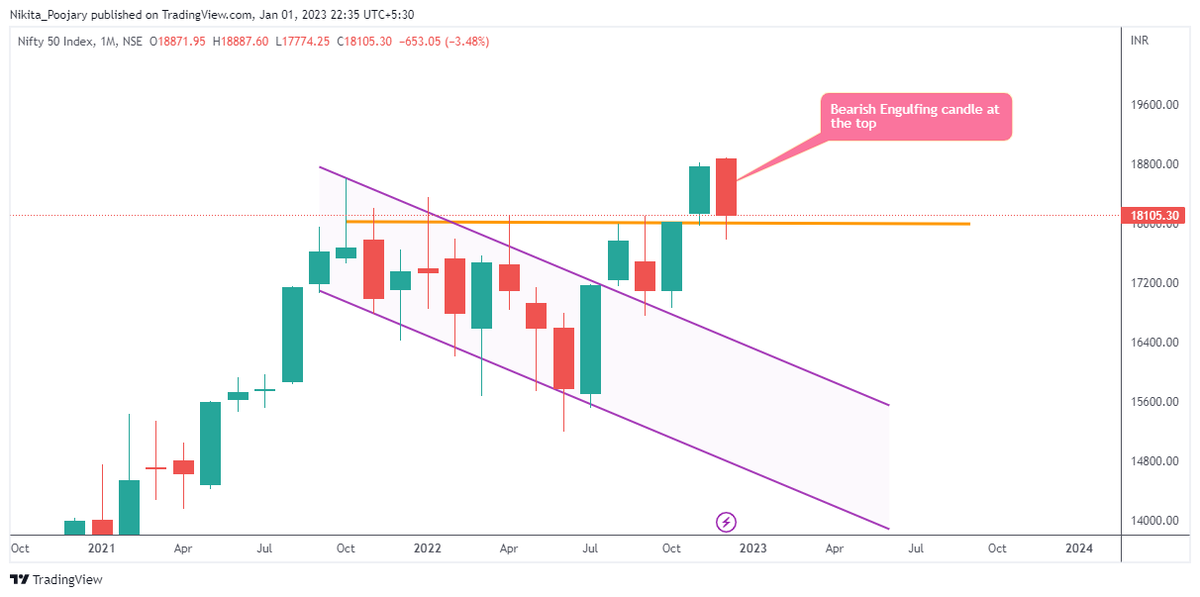
1. Monthly TF:
• Although the structure in monthly TF is of HH-HL, December monthly candle is a more of a bearish engulfing.
• However it is exactly at the support
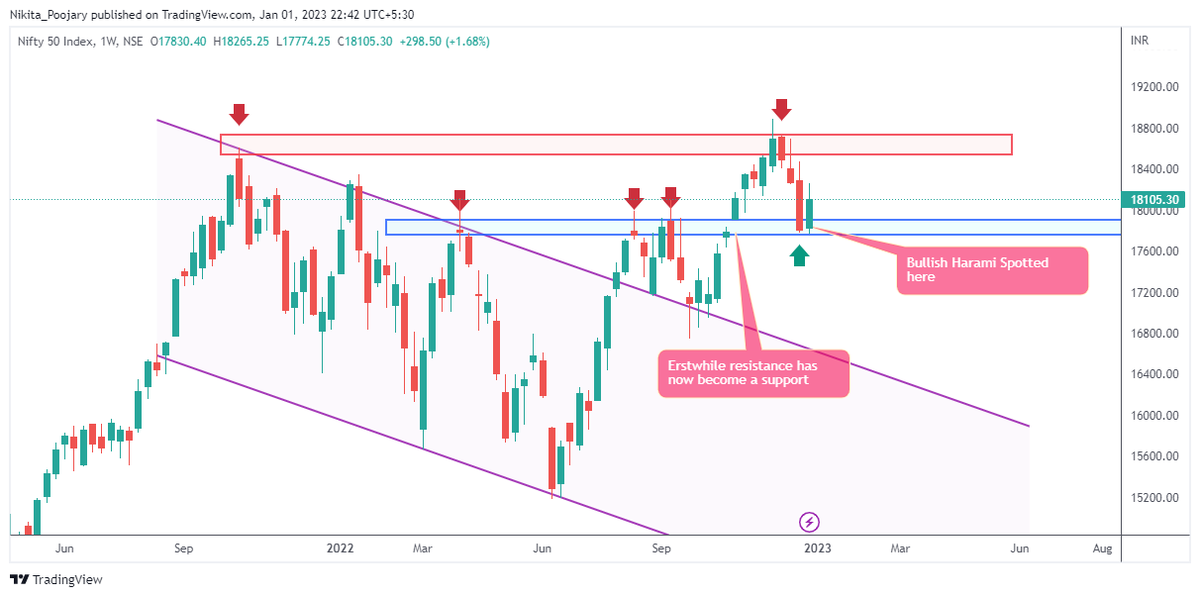
• 17800-18000 looks like a strong support.

#BANKNIFTY
— Nikita Poojary (@niki_poojary) January 1, 2023
Good prices seldom comes with good sentiments.
After a sharp retracement, expecting BNF to tocuh fresh ATH soon.
Outlook for the week Jan 1- 6, 2023.
THREAD: Deconstructing BANKNIFTY on 5 different TF's.
The stock exploded & went up as much as 63% from my price.
— Manas Arora (@iManasArora) June 22, 2020
Closed my position entirely today!#BroTip pic.twitter.com/CRbQh3kvMM
What an extended (away from averages) move looks like!!
— Manas Arora (@iManasArora) June 24, 2020
If you don't learn to sell into strength, be ready to give away the majority of your gains.#GLENMARK pic.twitter.com/5DsRTUaGO2
#HIKAL
— Manas Arora (@iManasArora) July 2, 2021
Closed remaining at 560
Reason: It is 40+% from 10wma. Super extended
Total revenue: 11R * 0.25 (size) = 2.75% on portfolio
Trade closed pic.twitter.com/YDDvhz8swT
When you see 15 green weeks in a row, that's the end of the move. *Extended*
— Manas Arora (@iManasArora) August 26, 2019
Simple price action analysis.#Seamecltd https://t.co/gR9xzgeb9K
These 8 websites will answer 80% of your FNO research questions! \U0001f9f5
— Aditya Todmal (@AdityaTodmal) October 1, 2022
Collaborated with @niki_poojary
A set up which has a minimum Risk/Reward (R/R) of 1:4
— Nikita Poojary (@niki_poojary) October 2, 2022
This set up can be used for intraday, option selling, option buying, as well as investing.
Maximum profit strategy by Subasish Pani.
Bollinger band set-up: \U0001f9f5!
Collaborated with @AdityaTodmal pic.twitter.com/aEIUVQF2XY
8 Options Trading books that every trader should read: \U0001f4da
— Aditya Todmal (@AdityaTodmal) October 2, 2022
Collaborated with @niki_poojary
Option Selling allowed me to 10x my career and income.
— Aditya Todmal (@AdityaTodmal) October 7, 2022
Some of the Top 1% of the traders have mastered this skill.
Here are 5 threads to make you a pro today (completely free):
Collaborated with @niki_poojary
\U0001f9f5