if I just type "foone blah" now...
argh chrome updated and it seems they've intentionally broken custom search engines. I have had a keyword search for "foone" which searches my own twitter, so I just type "foone BLAH" and it gives me a twitter search for when I said BLAH, right?

if I just type "foone blah" now...


1. this will break the "searched from the address bar" magic, which means google will make me do captchas if I search too fast
2. it will break search suggestions too
https://t.co/KShHdCMzeT
I finally figured out how to get back being able to press SPACE instead of being forced to use TAB while using custom search in Chrome.
— Artem Russakovskii (@ArtemR) February 3, 2021
If you see the pill, then you are currently forced to use TAB. To get spaces back: disable chrome://flags/#omnibox-keyword-search-button pic.twitter.com/U5UkEtNXpW

1. this is how it's been for years. I can type "foone blah" faster than you can blink, man. it's the #1 thing I DO in my browser. what appeals to me is THIS IS HOW IT FUCKING WORKS, DIPSHIT. CHANGING THINGS BECAUSE YOU FEEL LIKE IT IS NOT FUN
it's a very common key to press. the tab key is not so centrally located, because it's rare.
AND I SAY THAT AS A PYTHON PROGRAMMER

Maybe I could swap the keycaps and mod the key matrix or reflash the controller?

I have a keyboard from the mid-90s and I'm thinking about dumping a 8051 firmware, reverse engineering it, modifying it, and reflashing it onto the keyboard just to eliminate a tiny source of friction in using it.
C32191AE or 1001000220 have no results.
maybe I should just stick it in my EEPROM reader and see if it can dump it as a generic 8051, then flash the modded code onto a replacement flash-enabled 8051?

I'd want to desolder the 8051, but look, this controller PCB is basically sitting on top of the main keyboard PCB


what's a web browser? OH, YOU'LL SEE!


It's older than the US release of the Super Nintendo.

Zelda: A Link To The Past, The US release of the Super Nintendo, and the dissolution of the USSR hadn't happened yet, but would later that year.
This use a capacitive method to detect key presses. These seem to have been liked by some companies as a better feeling keyboard than a membrane, but the foam sometimes completely disintegrates so they don't last forever.


This is apparently for "overtravel". The key actually is detected shortly after you start pushing it down, but to make it feel like you can push it down farther, the foam is there and gets compressed.

https://t.co/syXLRu6Rly
https://t.co/8xEis5WHID
The two pins in the middle go off to other keys (since it's a matrix) so I can't really swap them without affecting other ones

This would be hard because they'd have to cross, so I'd either have to use insulating layers or drill through to the other side.

The ones on top are for a reverse-side jumper connection.


More from foone
A fun fact on the wikipedia page for the metal–oxide–semiconductor field-effect transistor:
it is the most frequently manufactured device in history, and the total number manufactured from 1960-2018 is 13 sextillion.
That's 13,000,000,000,000,000,000,000.
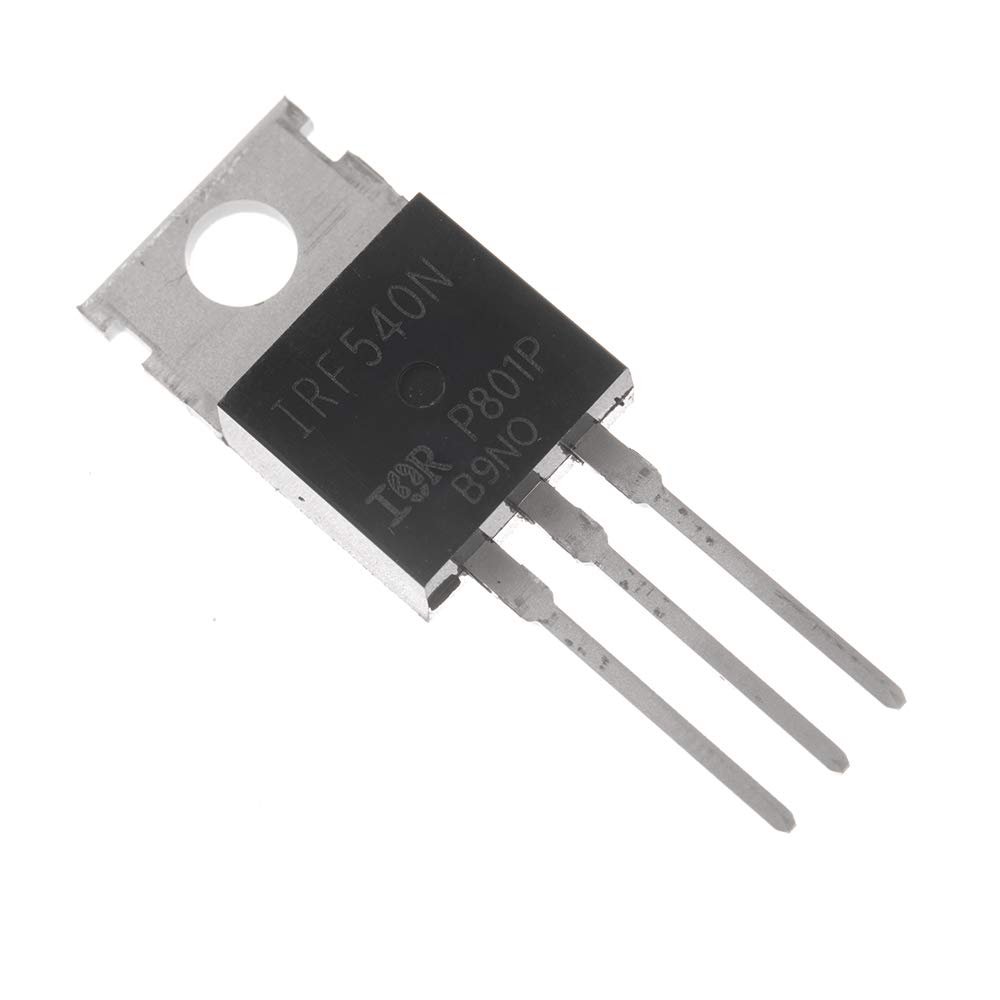
Though this picture is a bit misleading.
Even with devices this small, we couldn't make 13 sextillion of them in 60 years.
So imagine a chip like this. It's the 555 timer, which is one of the most popular integrated circuits ever made.
In 2017, it was estimated a billion are made every year.
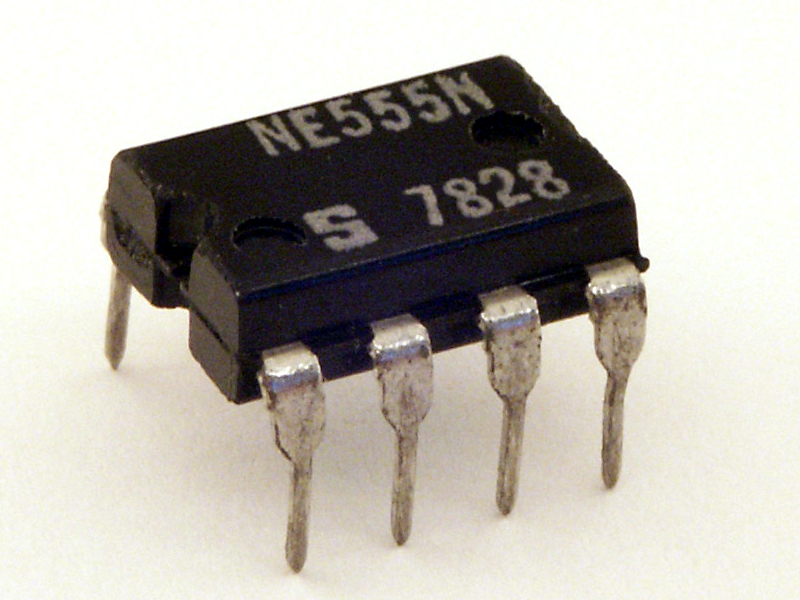
And at the heart of it is the die, which looks like this:
(from Ken Shirriff's blog)
https://t.co/mz5PQDjYqF
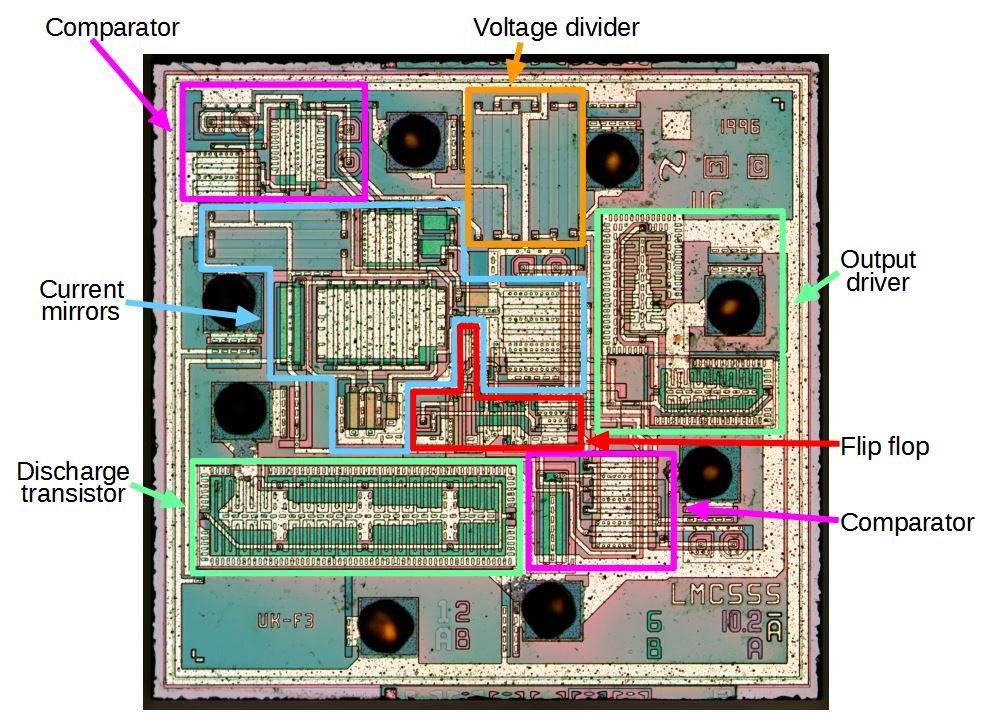
And that's fundamentally a bunch of CMOS transistors (along with some diodes and resistors), which are a type of MOSFET. How many of them are on a 555?
about 25. Not many, but it's a very simple chip.
it is the most frequently manufactured device in history, and the total number manufactured from 1960-2018 is 13 sextillion.
That's 13,000,000,000,000,000,000,000.
Though this picture is a bit misleading.
Even with devices this small, we couldn't make 13 sextillion of them in 60 years.
So imagine a chip like this. It's the 555 timer, which is one of the most popular integrated circuits ever made.
In 2017, it was estimated a billion are made every year.
And at the heart of it is the die, which looks like this:
(from Ken Shirriff's blog)
https://t.co/mz5PQDjYqF
And that's fundamentally a bunch of CMOS transistors (along with some diodes and resistors), which are a type of MOSFET. How many of them are on a 555?
about 25. Not many, but it's a very simple chip.
So I got out some CF cards and noticed something odd about this one. Do you see the weirdness?

How the fuck is a CF card "USB Enabled"?

So CF cards are a weird beast that act as either a PCMCIA card or an ATA/IDE card depending on a mode pin.
They're definitely not USB.
And it's not like that weird SanDisk card I have which you can fold in half and plug it in as a USB device.
It turns out the reason for "USB Enabled" is because it's a Lexar drive from the jumpSHOT era.
This is a normal CF card in most cases, you can use it in normal CF card readers and such
How the fuck is a CF card "USB Enabled"?
So CF cards are a weird beast that act as either a PCMCIA card or an ATA/IDE card depending on a mode pin.
They're definitely not USB.
And it's not like that weird SanDisk card I have which you can fold in half and plug it in as a USB device.
Flip it over, bend it in half, and now you can plug your SD card right into a USB port pic.twitter.com/jeBefP2xU1
— foone (@Foone) May 2, 2020
It turns out the reason for "USB Enabled" is because it's a Lexar drive from the jumpSHOT era.
This is a normal CF card in most cases, you can use it in normal CF card readers and such


More from Tech






So we had to develop technologies like this to barely manage control over limited areas in Iraq's few urban centers. Only ~8 in 100 Iraqi adults owns a personal vehicle. That rate is > 1 car/adult in America yet I have never seen any doctrine paper or work of fiction address this
We've seen and struggled in civil conflicts with instant, local, universal, distributed communications (cell phone era, basically every conflict since 2000). We've seen and struggled in conflicts with instant, global, universal distributed communications (everything since 2011).
The world's most overfunded military and glow in the dark agencies struggle and largely fail to contain conflicts where fhe vast, vast majority of people are locked into a ~5mi radius of their home.
How can they possibly contain a conflict in a nation with universal car ownership and the most developed road network in the world? The average car can travel over 400 miles on one tank of gas, how can you contain the potential of that kind of mobility?
I think that's partially why the system was so freaked out by 1/6. Yes, most of it is histrionics but you don't decide to indefinitely turn your capital into the Baghdad Green Zone with fortifications and 25k troops over histrionics alone.
Hey guys, just a friendly reminder. We're watching you. pic.twitter.com/bGwi1uJBwT
— CIA Metadata Analyst with 8 kids (@CiaKids) September 23, 2019
We've seen and struggled in civil conflicts with instant, local, universal, distributed communications (cell phone era, basically every conflict since 2000). We've seen and struggled in conflicts with instant, global, universal distributed communications (everything since 2011).
The world's most overfunded military and glow in the dark agencies struggle and largely fail to contain conflicts where fhe vast, vast majority of people are locked into a ~5mi radius of their home.
How can they possibly contain a conflict in a nation with universal car ownership and the most developed road network in the world? The average car can travel over 400 miles on one tank of gas, how can you contain the potential of that kind of mobility?
I think that's partially why the system was so freaked out by 1/6. Yes, most of it is histrionics but you don't decide to indefinitely turn your capital into the Baghdad Green Zone with fortifications and 25k troops over histrionics alone.
You May Also Like

The entire discussion around Facebook’s disclosures of what happened in 2016 is very frustrating. No exec stopped any investigations, but there were a lot of heated discussions about what to publish and when.
In the spring and summer of 2016, as reported by the Times, activity we traced to GRU was reported to the FBI. This was the standard model of interaction companies used for nation-state attacks against likely US targeted.
In the Spring of 2017, after a deep dive into the Fake News phenomena, the security team wanted to publish an update that covered what we had learned. At this point, we didn’t have any advertising content or the big IRA cluster, but we did know about the GRU model.
This report when through dozens of edits as different equities were represented. I did not have any meetings with Sheryl on the paper, but I can’t speak to whether she was in the loop with my higher-ups.
In the end, the difficult question of attribution was settled by us pointing to the DNI report instead of saying Russia or GRU directly. In my pre-briefs with members of Congress, I made it clear that we believed this action was GRU.
The story doesn\u2019t say you were told not to... it says you did so without approval and they tried to obfuscate what you found. Is that true?
— Sarah Frier (@sarahfrier) November 15, 2018
In the spring and summer of 2016, as reported by the Times, activity we traced to GRU was reported to the FBI. This was the standard model of interaction companies used for nation-state attacks against likely US targeted.
In the Spring of 2017, after a deep dive into the Fake News phenomena, the security team wanted to publish an update that covered what we had learned. At this point, we didn’t have any advertising content or the big IRA cluster, but we did know about the GRU model.
This report when through dozens of edits as different equities were represented. I did not have any meetings with Sheryl on the paper, but I can’t speak to whether she was in the loop with my higher-ups.
In the end, the difficult question of attribution was settled by us pointing to the DNI report instead of saying Russia or GRU directly. In my pre-briefs with members of Congress, I made it clear that we believed this action was GRU.

Stan Lee’s fictional superheroes lived in the real New York. Here’s where they lived, and why. https://t.co/oV1IGGN8R6

Stan Lee, who died Monday at 95, was born in Manhattan and graduated from DeWitt Clinton High School in the Bronx. His pulp-fiction heroes have come to define much of popular culture in the early 21st century.
Tying Marvel’s stable of pulp-fiction heroes to a real place — New York — served a counterbalance to the sometimes gravity-challenged action and the improbability of the stories. That was just what Stan Lee wanted. https://t.co/rDosqzpP8i

The New York universe hooked readers. And the artists drew what they were familiar with, which made the Marvel universe authentic-looking, down to the water towers atop many of the buildings. https://t.co/rDosqzpP8i

The Avengers Mansion was a Beaux-Arts palace. Fans know it as 890 Fifth Avenue. The Frick Collection, which now occupies the place, uses the address of the front door: 1 East 70th Street.
Stan Lee, who died Monday at 95, was born in Manhattan and graduated from DeWitt Clinton High School in the Bronx. His pulp-fiction heroes have come to define much of popular culture in the early 21st century.
Tying Marvel’s stable of pulp-fiction heroes to a real place — New York — served a counterbalance to the sometimes gravity-challenged action and the improbability of the stories. That was just what Stan Lee wanted. https://t.co/rDosqzpP8i
The New York universe hooked readers. And the artists drew what they were familiar with, which made the Marvel universe authentic-looking, down to the water towers atop many of the buildings. https://t.co/rDosqzpP8i
The Avengers Mansion was a Beaux-Arts palace. Fans know it as 890 Fifth Avenue. The Frick Collection, which now occupies the place, uses the address of the front door: 1 East 70th Street.