Hey👋
Hooks are powerful but confusing. Don't worry, I'll try to explain each hook in the easiest way in this thread series of React hooks
Let's start with useState, the most useful and simple hook in my opinion
Working with React hooks, first thing you need to do is to import the particular hook
It's quite easy👇
📌 import { useState } from "react";
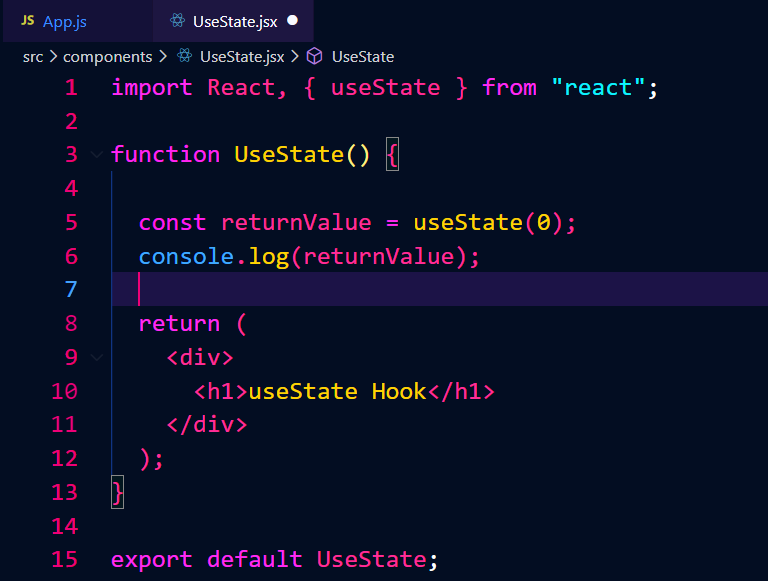
useState hook takes a parameter as initial value of state and return an array having two values
- The first value is the current state
- The second value is the function that allow us to change our state
Let me show you the return value by printing it out on console👇
Now we know what useState hook return, it's time to destruct our value
const [currentState, setCurrentState] = useState(0);
🔹 currentState is the value of our state
🔹 setCurrentState is the function using which we can change our state value
Let's build a simple counter so that we can understand it effectively.
Though, useState has a very powerful use from this small counters to handling the large forms
Basic boilerplate code for counter👇
Now we want to increase our counter by one by user clicks on the "PLUS" button and decrease the value by one when user clicks on the "MINUS" button
Here value/counter is nothing but our current state which we want to change accordingly
Here setCurrentState function comes into play
- We will write a handlePlusButton function in order to increase the counter by 1 every time user click plus button
This is pretty easy just call the setCurrentState function and increase counter value just like this👇
As now you can see, everytime I click the "PLUS" button my counter increases by one (see attached video)
Here we are changing our counter(state) using setCurrentState(setState) function
The other way of updating our state is passing a function inside setCurrentState function.
The function that we pass inside setCurrentState will take one param which is nothing but the previous value of counter
Something like this👇
Similarly we can write function for "MINUS" button
Though there is a problem with updating our state like this 👇
setCurrentState(currentState + 1);
If you call setCurrentState function two times like this, it will still increase our counter by 1 (see attached image)
There is an other way to passing our initial state inside useState hook. Like this👇
📌useState(() => 0);
This prevent running our useState hook every single time we render our component. Hence by passing the value like this can speed up our app performance
I think that's pretty much it for useState hook . I hope you get some idea and basic overview.
Feel free to drop your doubts and suggestion❤️
Next I'll catch you with the useEffect thread