I have 4 email addresses on my Gmail Business account with 2 different domains, like this:
[email protected]
[email protected]
[email protected]
[email protected]
But I'm only paying for 1 account, 6$/month.
I'll show you how you can set this up, too, in 12 steps. 👇🏼
3. On the next page click "Manage Domains". Now you'll see 2 options to choose from: "Add a domain" and "Add a domain alias".


Add the domain alias @businessB.com. You’ll be able to use both [email protected] and [email protected]. If you have teammates in Business A, they'll get new email addresses, too.

7. On the next page you select your domain provider, and then follow the steps that Google shows you. You'll need to go to your provider's site and do some settings.

Once this is done, the setup is basically finished. Now you need to make your users able to use the new domain.


More from Tech





Here is a simple example of a machine learning model.
I put it together a long time ago, and it was very helpful! I sliced it apart a thousand times until things started to make sense.
It's TensorFlow and Keras.
If you are starting out, this may be a good puzzle to solve.
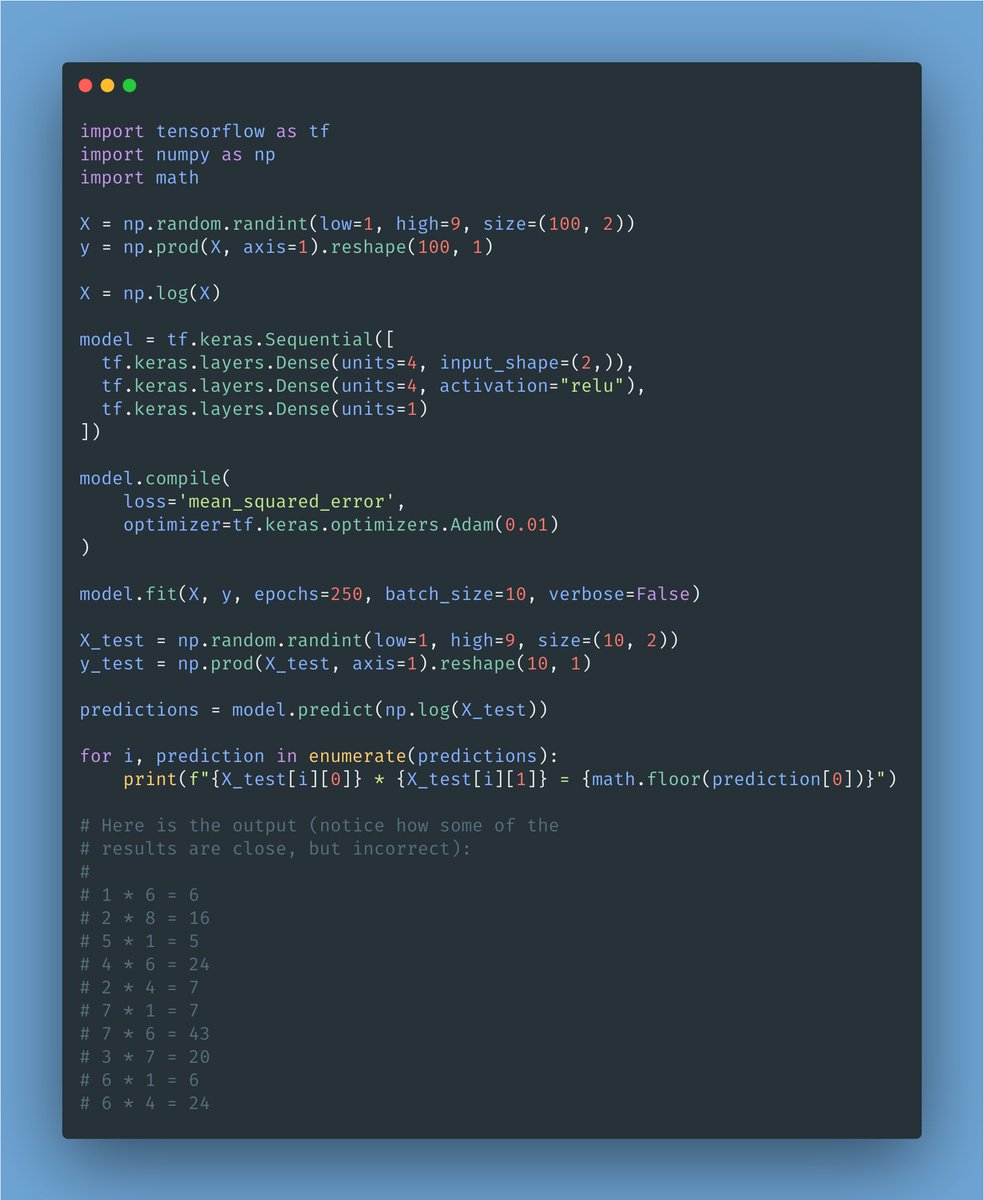
The goal of this model is to learn to multiply one-digit
I put it together a long time ago, and it was very helpful! I sliced it apart a thousand times until things started to make sense.
It's TensorFlow and Keras.
If you are starting out, this may be a good puzzle to solve.
The goal of this model is to learn to multiply one-digit
It is a good example of coding, what is the model?
— Freddy Rojas Cama (@freddyrojascama) February 1, 2021
You May Also Like

Keep dwelling on this:
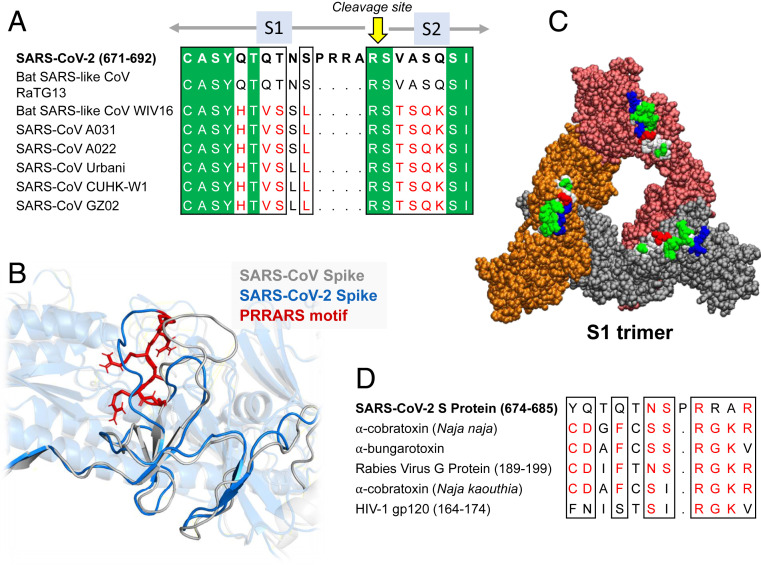
Further Examination of the Motif near PRRA Reveals Close Structural Similarity to the SEB Superantigen as well as Sequence Similarities to Neurotoxins and a Viral SAg.
The insertion PRRA together with 7 sequentially preceding residues & succeeding R685 (conserved in β-CoVs) form a motif, Y674QTQTNSPRRAR685, homologous to those of neurotoxins from Ophiophagus (cobra) and Bungarus genera, as well as neurotoxin-like regions from three RABV strains
(20) (Fig. 2D). We further noticed that the same segment bears close similarity to the HIV-1 glycoprotein gp120 SAg motif F164 to V174.
https://t.co/EwwJOSa8RK
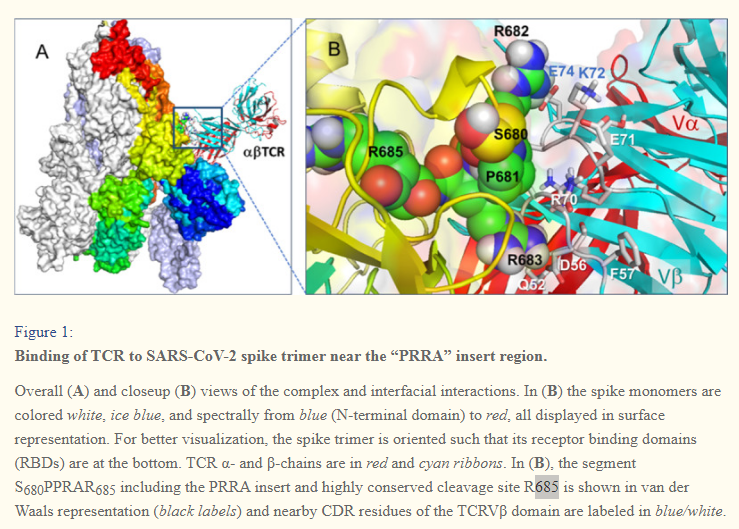
In (B), the segment S680PPRAR685 including the PRRA insert and highly conserved cleavage site *R685* is shown in van der Waals representation (black labels) and nearby CDR residues of the TCRVβ domain are labeled in blue/white
https://t.co/BsY8BAIzDa
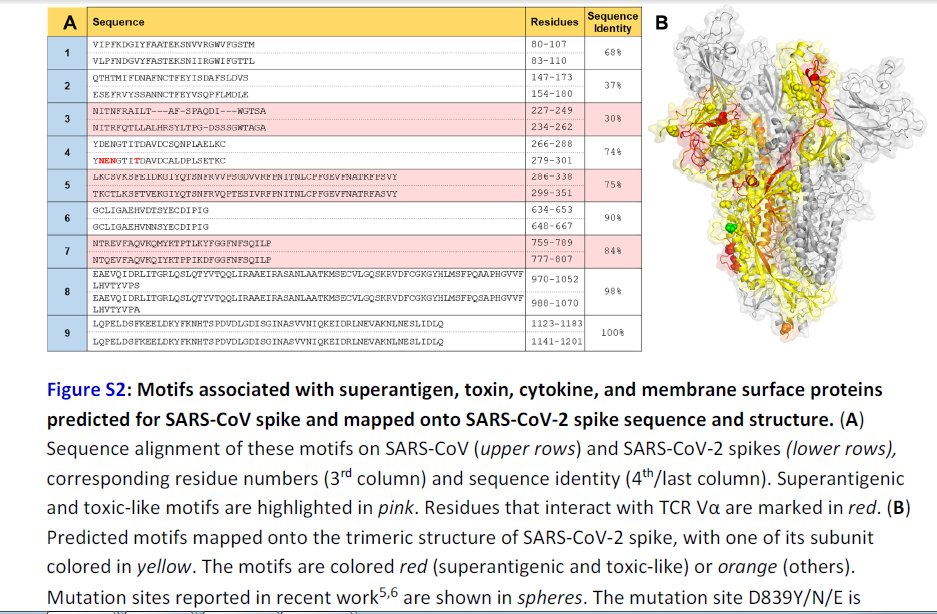
Sequence Identity %
https://t.co/BsY8BAIzDa
Y674 - QTQTNSPRRA - R685
Similar to neurotoxins from Ophiophagus (cobra) & Bungarus genera & neurotoxin-like regions from three RABV strains
T678 - NSPRRA- R685
Superantigenic core, consistently aligned against bacterial or viral SAgs
Further Examination of the Motif near PRRA Reveals Close Structural Similarity to the SEB Superantigen as well as Sequence Similarities to Neurotoxins and a Viral SAg.
The insertion PRRA together with 7 sequentially preceding residues & succeeding R685 (conserved in β-CoVs) form a motif, Y674QTQTNSPRRAR685, homologous to those of neurotoxins from Ophiophagus (cobra) and Bungarus genera, as well as neurotoxin-like regions from three RABV strains
(20) (Fig. 2D). We further noticed that the same segment bears close similarity to the HIV-1 glycoprotein gp120 SAg motif F164 to V174.
https://t.co/EwwJOSa8RK
In (B), the segment S680PPRAR685 including the PRRA insert and highly conserved cleavage site *R685* is shown in van der Waals representation (black labels) and nearby CDR residues of the TCRVβ domain are labeled in blue/white
https://t.co/BsY8BAIzDa
Sequence Identity %
https://t.co/BsY8BAIzDa
Y674 - QTQTNSPRRA - R685
Similar to neurotoxins from Ophiophagus (cobra) & Bungarus genera & neurotoxin-like regions from three RABV strains
T678 - NSPRRA- R685
Superantigenic core, consistently aligned against bacterial or viral SAgs