Excel has 100s of functions. Most them are not useful in day to day business setting. Here are the 10 most useful functions based on my 15 years of regular usage.
🧵

1) SUMIFS
Use it to add up values that meet one or more conditions.
=SUMIFS(A1:A100, B1:B100, "NZ", C1:C100, ">20") adds up all values in A1:A100 where column B is NZ and column C is more than 20.
2) XLOOKUP*
Use it to lookup a value and get corresponding value.
=XLOOKUP("Widget10", A1:A100, B1:B100)
looks the code Widget10 in column A and returns the price in column B.
* Works in Excel 365 / Web only
3) FILTER*
Use it to filter a list or range based on the conditions. Returns a range of values and automatically spills the values into next cells!
=FILTER(A1:C100, B1:B100="NZ")
returns the entire range of A1:C100 where column B has NZ.
4) COUNTIFS
Use it to count items that meet one or more criteria.
=COUNTIFS(B1:B100, "NZ", C1:C100, ">20")
tells us how many items have column B as NZ and column C more than 20.
5) INDEX
Use to it get a specific items from a list or range.
=INDEX(A1:A100, 12)
returns the 12th item in the range A1:A100
6) EDATE
Use it to calculate a future or past date after x months.
=EDATE(TODAY(), 6)
tells you what the date is exactly 6 months from now.
7) TEXTJOIN¹
Use it to combine text values in range with a specified delimiter.
=TEXTJOIN(" ",,"This","tweet","thread","is","awesome!")
returns the message "This tweet thread is awesome!"
¹ Works in Excel 2019 or above
8) UNIQUE*
Use it to extract unique values from a range.
=UNIQUE(A1:A100)
gives you the unique items in range A1:A100 by removing any any duplicates.
9) SORT*
Use it to sort a list or range by in ascending or descending order.
=SORT(A1:C100, 2, -1)
Sorts the range A1:C100 by column B(2nd column) in descending order (-1)
10) IFERROR
Use it to replace any formula errors with a relevant value.
=IFERROR(A1/0, "We can retweet this thread, but can't really divide by zero")
prints the message "We can retweet this thread, but can't really divide by zero"😉
11) For more on useful Excel functions, see these resources:
Top 15 Excel functions 👉 https://t.co/89m2aM6fYF
Advanced Excel Skills for you 👉 https://t.co/uRW5resifJ

More from All

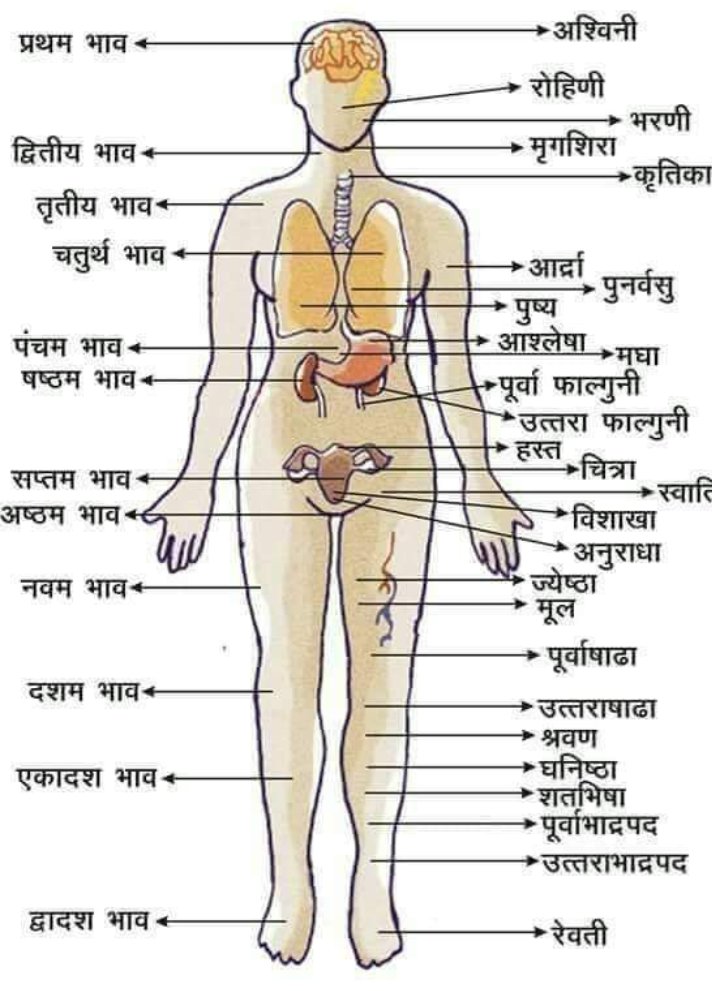
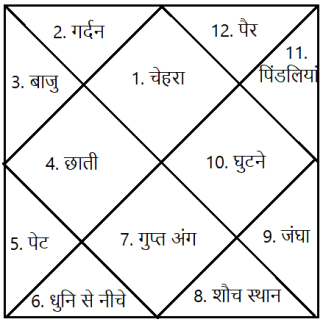
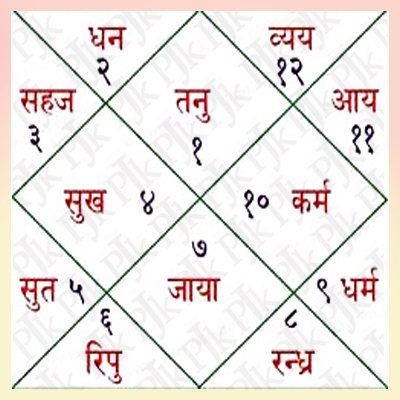
कुंडली में 12 भाव होते हैं। कैसे ज्योतिष द्वारा रोग के आंकलन करते समय कुंडली के विभिन्न भावों से गणना करते हैं आज इस पर चर्चा करेंगे।
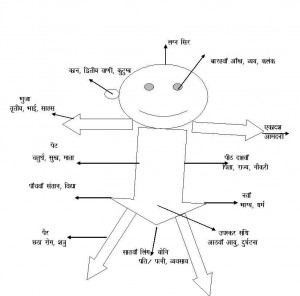
कुण्डली को कालपुरुष की संज्ञा देकर इसमें शरीर के अंगों को स्थापित कर उनसे रोग, रोगेश, रोग को बढ़ाने घटाने वाले ग्रह


रोग की स्थिति में उत्प्रेरक का कार्य करने वाले ग्रह, आयुर्वेदिक/ऐलोपैथी/होमियोपैथी में से कौन कारगर होगा इसका आँकलन, रक्त विकार, रक्त और आपरेशन की स्थिति, कौन सा आंतरिक या बाहरी अंग प्रभावित होगा इत्यादि गणना करने में कुंडली का प्रयोग किया जाता है।


मेडिकल ज्योतिष में आज के समय में Dr. K. S. Charak का नाम निर्विवाद रूप से प्रथम स्थान रखता है। उनकी लिखी कई पुस्तकें आज इस क्षेत्र में नए ज्योतिषों का मार्गदर्शन कर रही हैं।
प्रथम भाव -
इस भाव से हम व्यक्ति की रोगप्रतिरोधक क्षमता, सिर, मष्तिस्क का विचार करते हैं।


द्वितीय भाव-
दाहिना नेत्र, मुख, वाणी, नाक, गर्दन व गले के ऊपरी भाग का विचार होता है।
तृतीय भाव-
अस्थि, गला,कान, हाथ, कंधे व छाती के आंतरिक अंगों का शुरुआती भाग इत्यादि।

चतुर्थ भाव- छाती व इसके आंतरिक अंग, जातक की मानसिक स्थिति/प्रकृति, स्तन आदि की गणना की जाती है


पंचम भाव-
जातक की बुद्धि व उसकी तीव्रता,पीठ, पसलियां,पेट, हृदय की स्थिति आंकलन में प्रयोग होता है।

षष्ठ भाव-
रोग भाव कहा जाता है। कुंडली मे इसके तत्कालिक भाव स्वामी, कालपुरुष कुंडली के स्वामी, दृष्टि संबंध, रोगेश की स्थिति, रोगेश के नक्षत्र औऱ रोगेश व भाव की डिग्री इत्यादि।
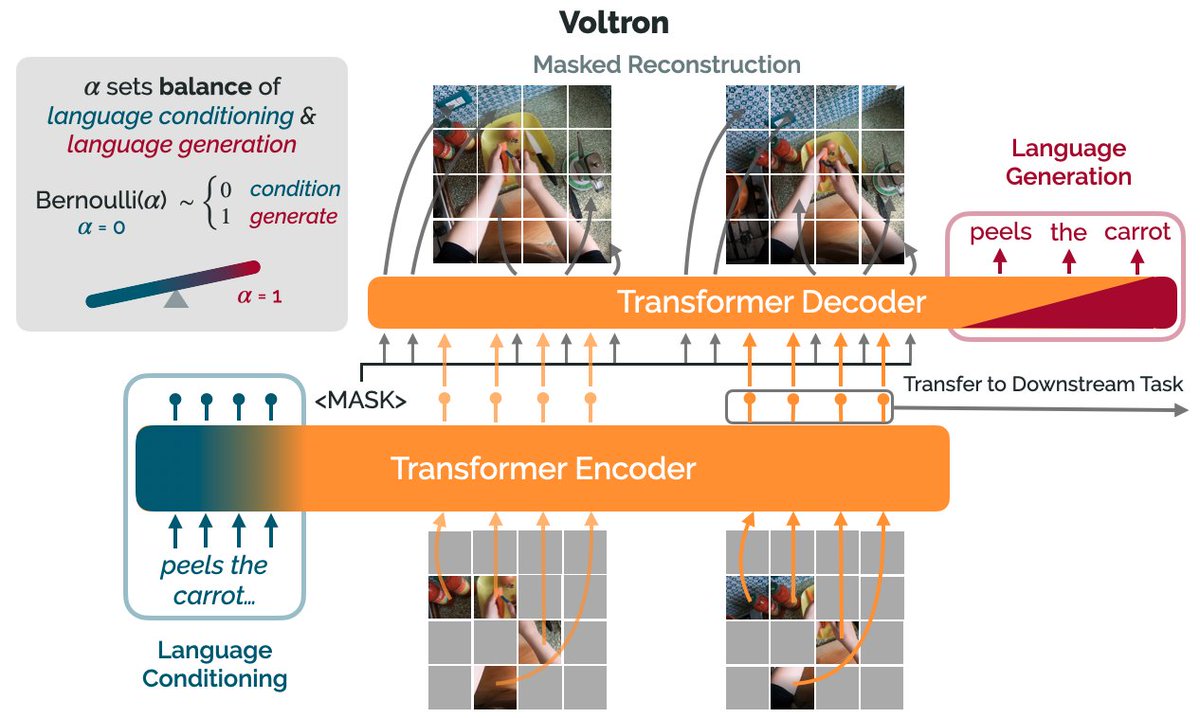
How can we use language supervision to learn better visual representations for robotics?

Introducing Voltron: Language-Driven Representation Learning for Robotics!

Paper: https://t.co/gIsRPtSjKz
Models: https://t.co/NOB3cpATYG
Evaluation: https://t.co/aOzQu95J8z

🧵👇(1 / 12)


Videos of humans performing everyday tasks (Something-Something-v2, Ego4D) offer a rich and diverse resource for learning representations for robotic manipulation.

Yet, an underused part of these datasets are the rich, natural language annotations accompanying each video. (2/12)

The Voltron framework offers a simple way to use language supervision to shape representation learning, building off of prior work in representations for robotics like MVP (
https://t.co/Pb0mk9hb4i) and R3M (https://t.co/o2Fkc3fP0e).

The secret is *balance* (3/12)

Starting with a masked autoencoder over frames from these video clips, make a choice:

1) Condition on language and improve our ability to reconstruct the scene.

2) Generate language given the visual representation and improve our ability to describe what's happening. (4/12)

By trading off *conditioning* and *generation* we show that we can learn 1) better representations than prior methods, and 2) explicitly shape the balance of low and high-level features captured.

Why is the ability to shape this balance important? (5/12)

You May Also Like